Listings API
The Whack API is organized around REST. Our API has predictable resource-oriented URLs, accepts JSON-encoded request bodies, returns JSON-encoded responses, and uses standard HTTP response codes, authentication, and verbs.
The Whack API differs for every account as we tailor functionality. All API requests must be made over HTTPS. Calls made over plain HTTP will fail.
Core Features
- RESTful design — Predictable endpoints following REST conventions
- Flexible identifiers — Use your own external_id or Whack-generated IDs interchangeably
- Extensible metadata — Store custom integration data
- Type-safe — Strongly typed fields with validation
- Cursor pagination — Efficient traversal of large datasets
Base URL
Authentication
The Whack API uses API keys to authenticate requests. Include your API key in the X-API-KEY header with every request.
Your API keys carry many privileges, so be sure to keep them secure. Do not share your secret API keys in publicly accessible areas such as GitHub, client-side code, and so forth.
All API requests must be made over HTTPS. API requests without authentication will fail.
API Key Creation
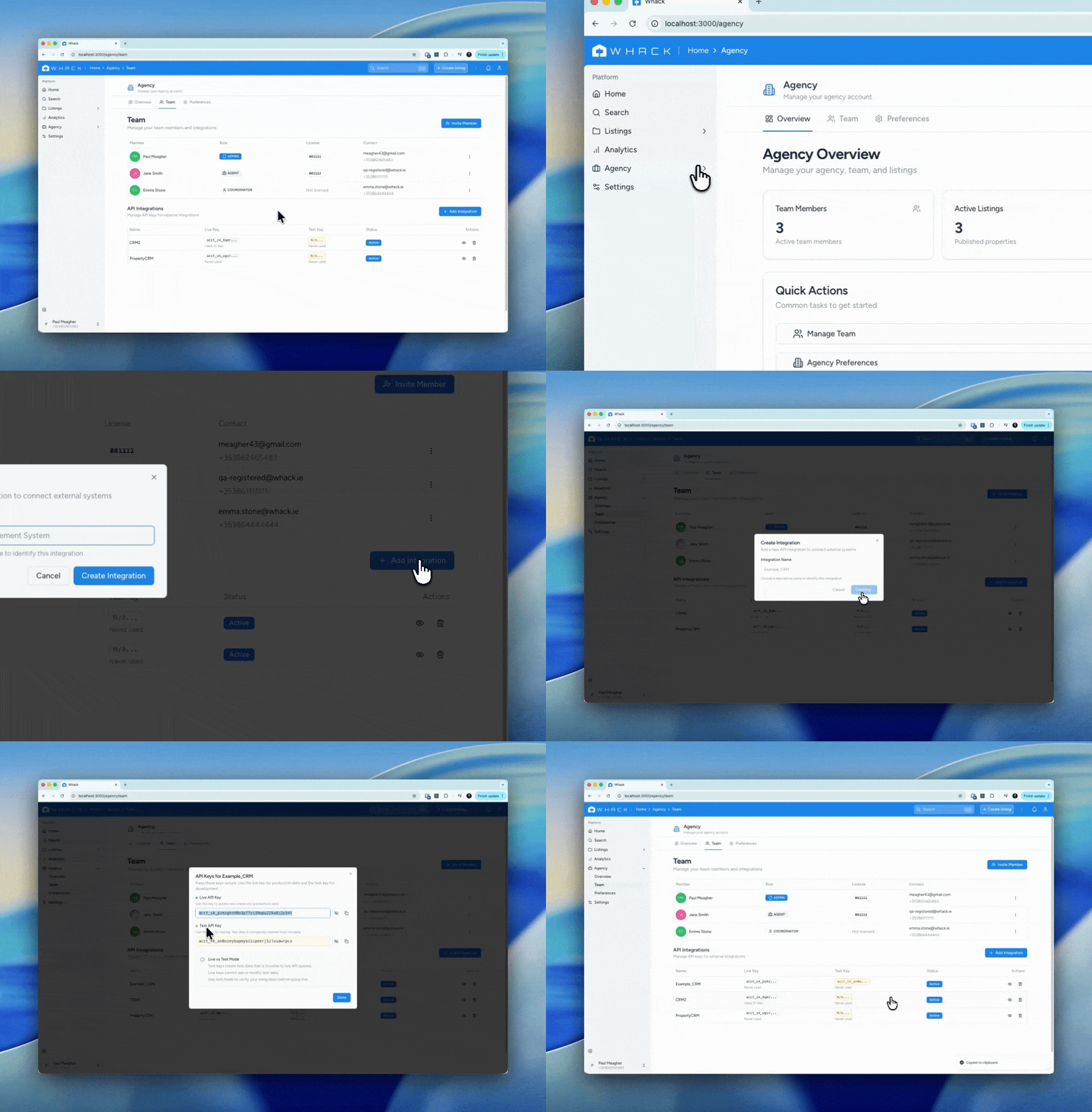
Each agency generates their own API keys from the Agency>Team page on my.whack.ie. Once generated, agencies can share these keys with their integration partners (property management systems, CRMs, or custom integrations).
Multi-tenancy & Scoping
Each API key is unique to an agency (tenant). All API requests are automatically scoped to that agency—you can only access and modify listings belonging to your agency. This means:
- Your
external_idvalues are unique within your agency, not globally - Multiple agencies can use the same
external_idwithout conflict - You cannot access or modify listings from other agencies
- Integration partners managing multiple agencies should store a separate API key for each agency
Getting Your API Keys
Generate API keys from the Agency > Team page on my.whack.ie.
Livemode & Testmode
The Whack API supports two completely isolated environments: livemode for production data and testmode for development and testing. Each environment has its own API key.
Key Prefixes
API keys are prefixed to indicate which mode they operate in:
acct_sk_*— Livemode key (production data)acct_tk_*— Testmode key (test data)
Data Isolation
Livemode and testmode data are completely isolated at the database level:
- Listings created with a testmode key are invisible to livemode API queries
- Livemode keys cannot see or modify testmode data
- The same
external_idcan exist in both modes without conflict - Testmode listings do not appear on the public Whack website
When to Use Testmode
- Building and debugging your integration
- Testing API calls without affecting production data
- Verifying your sync logic before going live
- Training staff on the API without risk
Best Practice
Always develop and test your integration using a testmode key first. Once everything works correctly, switch to your livemode key for production.
Viewing Testmode Data in Dashboard
Toggle testmode in the dashboard to view and manage your test listings.
The Listing Object
All listing endpoints return this object structure. Fields marked as always returned are present in every response, while optional fields may be null or omitted.
Attributes
| Parameter | Type | Description |
|---|---|---|
id | string | Whack-generated unique identifier, always prefixed with lst_. Always returned in responses, never sent in requests. Example: lst_a1b2c3d4e5f6 |
object | string | Object type identifier, always "listing". Always returned in responses, never sent in requests. Example: listing |
external_id | string | Your system's identifier. null if not provided during creation. Example: mycrm_12345 |
addressrequired | string | Full property address |
price_asking | integer | Asking price in whole currency units. Can be null for POA (Price on Application) listings. |
beds | integer | Number of bedrooms. Can be null for commercial properties, agricultural land, or properties where bedroom count is not applicable. |
baths | integer | Number of bathrooms |
floor_area | integer | Floor area in square meters |
lat | float | Latitude coordinate. Auto-calculated from address via geocoding if not provided. Example: 53.349805 |
lng | float | Longitude coordinate. Auto-calculated from address via geocoding if not provided. Example: -6.260310 |
type | string | Property type: house, apartment, bungalow, commercial, office, retail, industrial, agricultural, land, etc. |
eircode | string | Irish postal code |
description | string | Full property description |
images | array | Array of image objects. Each object contains url (Whack CDN URL), source_url (original URL), and optional caption and alt_text for accessibility. |
listing_agent | object | Agent contact information object. All nested fields are optional. If only license is provided, Whack will attempt to auto-populate remaining fields from the agent's Whack profile and PSRA database. |
name | string | Agent's full name Example: John Doe |
license | string | PSRA license number. If this is the only field provided, other fields will be auto-populated. Example: 001234 |
phone | string | Agent contact phone number Example: +353 1 234 5678 |
email | string | Agent primary email address Example: john.doe@agency.ie |
enquiry_email | string | Optional email for routing enquiries (if different from agent email) Example: enquiries@agency.ie |
publish_status | string | Publication status: draft, published, unlisted, archived. Defaults to draft if not provided. |
sale_status | string | Sales lifecycle: for_sale, bid_accepted, sale_agreed, sold, off_market |
metadata | object | Key-value pairs for custom integration data. Defaults to empty object {} if not provided. |
created | timestamp | ISO 8601 timestamp of creation. Always returned in responses, never sent in requests. Example: 2025-01-15T10:30:00Z |
updated | timestamp | ISO 8601 timestamp of last update. Always returned in responses, never sent in requests. Example: 2025-01-15T14:20:00Z |
Example Listing Object
{ "id": "lst_a1b2c3d4e5f6", "object": "listing", "external_id": "mycrm_12345", "address": "123 Main Street, Dublin 2, D02 XY12", "price_asking": 450000, "beds": 3, "baths": 2, "floor_area": 120, "lat": 53.349805, "lng": -6.260310, "type": "house", "eircode": "D02 XY12", "description": "Beautiful 3-bedroom family home...", "images": [ { "url": "https://images.whack.ie/a1b2c3d4-e5f6.jpg", "source_url": "https://yourcdn.com/property-123-img1.jpg", "caption": "Living room", "alt_text": "Spacious living room with fireplace" }, { "url": "https://images.whack.ie/g7h8i9j0-k1l2.jpg", "source_url": "https://yourcdn.com/property-123-img2.jpg", "caption": "Kitchen", "alt_text": "Modern kitchen with island" } ], "listing_agent": { "name": "John Doe", "license": "001234", "phone": "+353 1 234 5678", "email": "john.doe@agency.ie", "enquiry_email": "enquiries@agency.ie" }, "publish_status": "published", "sale_status": "for_sale", "metadata": { "source_system": "my_crm", "agent_ref": "JD-089" }, "created": "2025-01-15T10:30:00Z", "updated": "2025-01-15T10:30:00Z"}Create or Update Listing
Creates a new listing, or updates an existing listing if an external_id is provided that already exists for your account. Whack generates a unique ID prefixed with lst_ for new listings. This upsert behavior enables simple sync workflows where you can POST your current data without checking if the listing exists first.
Understanding IDs
Without external_id: Whack generates an ID (e.g., lst_a1b2c3d4e5f6). You must store this ID to update the listing later.
With external_id: Whack generates an ID and stores your external_id. You can use either ID in all API calls (GET, POST, DELETE), allowing you to store zero additional information if desired.
Disambiguation: Whack IDs are prefixed with lst_ to distinguish them from external_ids. This allows the API to automatically route requests based on ID format.
Tenant scoping: Your external_id is unique within your agency (tenant), not globally. Multiple agencies can use the same external_id without conflict—your API key automatically scopes all requests to your agency.
Upsert Behavior
When you include an external_id, the API automatically creates or updates based on whether that ID exists:
- New external_id → Creates listing, returns
201 Created - Existing external_id → Updates listing, returns
200 OK - No external_id → Always creates new listing, returns
201 Created
This means you can safely POST your entire listing database without tracking which listings already exist in Whack—perfect for sync workflows.
Parameters
| Parameter | Type | Description |
|---|---|---|
addressrequired | string | Full property address including eircode Example: 123 Main Street, Dublin 2, D02 XY12 |
price_asking | integer | Asking price in whole currency units. Omit or set to null for POA (Price on Application) listings. Example: 450000 |
beds | integer | Number of bedrooms. Can be omitted for commercial properties, land, or properties where bedroom count is not applicable. Example: 3 |
baths | integer | Number of bathrooms Example: 2 |
floor_area | integer | Floor area in square meters Example: 120 |
lat | float | Latitude coordinate. If not provided, Whack will auto-calculate from address via geocoding. Example: 53.349805 |
lng | float | Longitude coordinate. If not provided, Whack will auto-calculate from address via geocoding. Example: -6.260310 |
type | string | Type of property: house, apartment, bungalow, commercial, office, retail, industrial, agricultural, land, etc. Example: house |
eircode | string | Irish postal code Example: D02 XY12 |
description | string | Full property description |
images | array | Array of image objects with source_url (your CDN URL), and optional caption and alt_text. Whack copies images asynchronously to images.whack.ie and returns mapped URLs in responses. Images are processed in the background—they may not be immediately available. Example: [{"source_url": "https://yourcdn.com/img1.jpg", "caption": "Living room", "alt_text": "Spacious living area"}] |
listing_agent | object | Agent contact information object. All nested fields are optional. If only license is provided, Whack will auto-populate remaining fields from the agent's Whack profile and PSRA database. |
name | string | Agent's full name Example: John Doe |
license | string | PSRA license number. If this is the only field provided, other fields will be auto-populated from Whack profile and PSRA database. Example: 001234 |
phone | string | Agent contact phone number Example: +353 1 234 5678 |
email | string | Agent primary email address Example: john@agency.ie |
enquiry_email | string | Optional email for routing enquiries (if different from agent email) Example: enquiries@agency.ie |
publish_status | string | Publication status: draft, published, unlisted, archived Example: published |
sale_status | string | Sales lifecycle: for_sale, bid_accepted, sale_agreed, sold, off_market Example: for_sale |
external_id | string | Your system's unique identifier for this property. Can be used in place of the Whack ID in all API calls. Whack IDs are prefixed with lst_ for disambiguation. Example: mycrm_12345 |
metadata | object | Additional custom key-value pairs for integration-specific data Example: {"source_system": "my_crm", "agent_ref": "JD-089"} |
https://api.whack.ie/v1/listingsResponse (201 Created or 200 OK)
// 201 Created for new listings// 200 OK when external_id already exists (upsert){ "id": "lst_a1b2c3d4e5f6", "object": "listing", "created": "2025-01-15T10:30:00Z", "updated": "2025-01-15T10:30:00Z", "external_id": "mycrm_12345", "address": "123 Main Street, Dublin 2", "price_asking": 450000, "beds": 3, "lat": 53.349805, "lng": -6.260310, "images": [ { "url": "https://images.whack.ie/a1b2c3d4-e5f6.jpg", "source_url": "https://yourcdn.com/property-123-img1.jpg", "caption": "Living room", "alt_text": "Spacious living room with fireplace" }, { "url": "https://images.whack.ie/g7h8i9j0-k1l2.jpg", "source_url": "https://yourcdn.com/property-123-img2.jpg", "caption": "Kitchen" } ], "listing_agent": { "name": "John Doe", "license": "001234", "phone": "+353 1 234 5678", "email": "john.doe@agency.ie", "enquiry_email": "enquiries@agency.ie" }, "metadata": {}}Get Listing
Retrieves a single listing by ID. Use either the Whack-generated ID or your external_id in the URL.
Returns a 404 Not Found error if the listing doesn't exist or doesn't belong to your account.
https://api.whack.ie/v1/listings/{id}Response (200 OK)
{ "id": "lst_a1b2c3d4e5f6", "object": "listing", "external_id": "mycrm_12345", "address": "123 Main Street, Dublin 2, D02 XY12", "price_asking": 450000, "beds": 3, "baths": 2, "floor_area": 120, "lat": 53.349805, "lng": -6.260310, "type": "house", "images": [ { "url": "https://images.whack.ie/a1b2c3d4-e5f6.jpg", "source_url": "https://yourcdn.com/property-123-img1.jpg", "caption": "Living room" } ], "listing_agent": { "name": "John Doe", "license": "001234", "phone": "+353 1 234 5678", "email": "john.doe@agency.ie", "enquiry_email": "enquiries@agency.ie" }, "publish_status": "published", "sale_status": "for_sale", "metadata": { "source_system": "my_crm" }, "created": "2025-01-15T10:30:00Z", "updated": "2025-01-15T10:30:00Z"}Update Listing
Update a listing by including its ID in the URL. Use either the Whack-generated ID (e.g., lst_a1b2c3d4e5f6) or your external_id. Only include fields you want to change—omitted fields retain their existing values. Exception: The images field uses full replacement semantics (see Update Images below).
Update Asking Price
Update the asking price by sending only the price_asking field. Both Whack IDs and external_ids work interchangeably in the URL.
https://api.whack.ie/v1/listings/{id}Response
{ "id": "lst_a1b2c3d4e5f6", "price_asking": 425000, "updated": "2025-01-15T14:20:00Z", ...}Update Sale Status
Track the sales lifecycle using sale_status. Valid values: for_sale,bid_accepted,sale_agreed,sold,off_market.
https://api.whack.ie/v1/listings/mycrm_12345Response
{ "id": "lst_a1b2c3d4e5f6", "sale_status": "sale_agreed", "updated": "2025-01-15T14:25:00Z", ...}Mark as Unlisted
Hide a listing from public searches using publish_status. Valid values: draft,published,unlisted,archived.
https://api.whack.ie/v1/listings/mycrm_12345Response
{ "id": "lst_a1b2c3d4e5f6", "publish_status": "unlisted", "updated": "2025-01-15T14:30:00Z", ...}Update Images
Image updates use full replacement semantics with smart URL mapping:
- Omit images field → Existing images unchanged
- Empty array
[]→ All images removed - Populated array → Replaces all images:
- Existing
source_url→ Reuses Whack URL (no re-download) - New
source_url→ Queues async copy, creates new Whack URL - URLs not in array → Deleted
- Existing
This design lets you send your full current image list without worrying about duplicates—Whack handles deduplication automatically based on source_url.
https://api.whack.ie/v1/listings/mycrm_12345Response
{ "id": "lst_a1b2c3d4e5f6", "images": [ { "url": "https://images.whack.ie/existing-uuid.jpg", "source_url": "https://yourcdn.com/property-123-img1.jpg", "caption": "Living room", "alt_text": "Updated caption" }, { "url": "https://images.whack.ie/new-uuid.jpg", "source_url": "https://yourcdn.com/property-123-new-img.jpg", "caption": "New bedroom photo" } ], "updated": "2025-01-15T14:35:00Z", ...}List Listings
Retrieve all listings or filter by status. Results are paginated and sorted by creation date (newest first).
Filtering Logic
Multiple filter parameters use AND logic. For example, ?publish_status=published&sale_status=for_sale returns only listings that are both published AND for sale. Currently, filtering by multiple values for a single parameter (OR logic) is not supported.
Query Parameters
| Parameter | Type | Description |
|---|---|---|
limit | integer | Number of results to return (default: 10, max: 100) Example: 20 |
starting_after | string | Cursor for pagination. Returns results after this listing ID. Example: lst_a1b2c3d4e5f6 |
ending_before | string | Cursor for pagination. Returns results before this listing ID. Example: lst_z9y8x7w6v5u4 |
publish_status | string | Filter by publication status: draft, published, unlisted, archived Example: published |
sale_status | string | Filter by sales status: for_sale, bid_accepted, sale_agreed, sold, off_market Example: for_sale |
https://api.whack.ie/v1/listingsResponse
{ "object": "list", "url": "/v1/listings", "has_more": true, "data": [ { "id": "lst_a1b2c3d4e5f6", "address": "123 Main Street, Dublin 2", "price_asking": 450000, "beds": 3, "lat": 53.349805, "lng": -6.260310, "publish_status": "published", "sale_status": "for_sale", ... }, { "id": "lst_b2c3d4e5f6g7", "address": "456 Oak Avenue, Cork", "price_asking": 325000, "beds": 2, "lat": 51.896893, "lng": -8.486316, "publish_status": "published", "sale_status": "for_sale", ... } ]}Delete Listing
Permanently deletes a listing from the database. This action cannot be undone. Use either the Whack ID or your external_id in the URL.
Returns a 404 Not Found error if the listing doesn't exist. Returns 204 No Content on successful deletion.
Delete vs Archive
DELETE endpoint (this): Permanently removes the listing from the database. All data is lost and cannot be recovered.
Archive (recommended): Set publish_status to archived via POST to hide the listing while preserving data for historical records.
Use archive for most cases. Only use DELETE when you need to completely remove all data (e.g., test listings, GDPR requests).
https://api.whack.ie/v1/listings/{id}Response (204 No Content)
No response body returned.Working with Images
The Whack API handles image storage and delivery to optimize performance and reliability. When you provide image URLs from your system, Whack copies them to images.whack.ie and maintains a mapping between your original URL and the Whack CDN URL.
How It Works
- You send:
source_url(your CDN/server URL) - Whack copies: Image to
images.whack.ieasynchronously - Whack returns:
url(Whack CDN URL) +source_urlmapping - On updates: Same
source_urlreuses existing Whack URL (no re-download)
Request Fields (What You Send)
| Parameter | Type | Description |
|---|---|---|
source_urlrequired | string | Your original image URL. Used for deduplication and mapping. Example: https://yourcdn.com/img1.jpg |
caption | string | User-friendly image description (e.g., "Living room", "Kitchen"). Example: Living room |
alt_text | string | Accessibility text for screen readers. Example: Spacious living room with fireplace |
Response Fields (What Whack Returns)
| Parameter | Type | Description |
|---|---|---|
url | string | Whack CDN URL where the image is hosted. Generated by Whack. Example: https://images.whack.ie/uuid-123.jpg |
source_url | string | Your original image URL (echoed back for mapping). Example: https://yourcdn.com/img1.jpg |
caption | string | User-friendly image description. Example: Living room |
alt_text | string | Accessibility text for screen readers. Example: Spacious living room with fireplace |
Async Processing
Images Process in Background
Image downloads happen asynchronously. The API accepts your request immediately and returns Whack URLs, but actual image files may not be available for a few seconds.
This design ensures fast API responses. If an image fails to download (invalid URL, unreachable server), Whack will retry and eventually mark it as failed, but the listing creation/update still succeeds.
Common Scenarios
Reordering Images
The order of images in the array determines display order. To reorder, send the same images in a different sequence.
Adding New Images
Include new source_url values in the images array. Whack will copy them and add them to the listing.
Removing Images
Exclude the image from the array. Any source_url not in the update request will be deleted from the listing.
Updating Captions/Alt Text
Send the same source_url with updated caption or alt_text. Whack reuses the existing image file but updates the metadata.
Request Format
Response Format
{ "images": [ { "url": "https://images.whack.ie/uuid-123.jpg", "source_url": "https://yourcdn.com/img1.jpg", "caption": "Living room", "alt_text": "Spacious living area" } ]}Example: Full Image Update Flow
Metadata
The metadata object is an extensible key-value store for integration-specific data. Use it to store sync state, custom attributes, or any other information relevant to your integration. Once set, metadata is returned in all API responses.
Guidelines
- Use the top-level
external_idfield for your primary identifier (not metadata) - Namespace keys to avoid conflicts in multi-integration scenarios (e.g.,
myapp_sync_status) - Metadata is merged on update—only send keys you want to add or change
- Metadata is indexed and returned in all API responses
- Avoid storing sensitive information
Update Behavior: Merge
When updating metadata, new keys are added and existing keys are updated. Keys not included in the request remain unchanged. This merge behavior prevents accidental data loss and supports multiple integrations working with the same listing.
Example: If your listing has {"source": "crm", "agent": "JD"} and you POST {"last_sync": "2025-12-03"}, the result is {"source": "crm", "agent": "JD", "last_sync": "2025-12-03"} (existing keys kept, new key added).
To delete a key: Send null as the value. Example: {"agent": null} removes the agent key.
To clear all metadata: Send an empty object: {"metadata": {}}
https://api.whack.ie/v1/listingsResponse
{ "id": "lst_a1b2c3d4e5f6", "external_id": "prop_12345", "address": "123 Main Street, Dublin 2", "price_asking": 450000, "beds": 3, "metadata": { "source_system": "my_crm", "last_sync": "2025-12-02T16:00:00Z", "agent_ref": "JD-2024-089" }, "created": "2025-01-15T10:30:00Z", "updated": "2025-01-15T10:30:00Z"}Example: Metadata Merge Operations
Pagination
List endpoints use cursor-based pagination for efficient traversal of large datasets. Each page returns a has_more indicator and the last item's ID serves as the cursor for the next page.
How it Works
- Use
limitto control page size (default: 10, max: 100) - Use
starting_afterto fetch the next page (forward pagination) - Use
ending_beforeto fetch the previous page (backward pagination) - Check
has_moreto determine if additional results exist
Example: Next Page
To fetch the next page, use the ID of the last item from the current page as the starting_after cursor.
https://api.whack.ie/v1/listingsResponse Structure
{ "object": "list", "url": "/v1/listings", "has_more": false, "data": [...]}Valid Enum Values
These fields only accept specific predefined values. Providing an invalid value will return a parameter_invalid error with HTTP status 400.
publish_status
Controls listing visibility. Defaults to draft for new listings.
| Value | Description |
|---|---|
draft | Not visible publicly. Default for new listings. |
published | Visible in public search results on Whack. |
unlisted | Hidden from search but accessible via direct link. |
archived | Soft-deleted. Preserved but hidden everywhere. |
sale_status
Tracks the property through the sales lifecycle.
| Value | Description |
|---|---|
for_sale | Actively listed for sale. |
bid_accepted | Bid accepted but not yet sale agreed. |
sale_agreed | Sale agreed with buyer. |
sold | Sale completed. |
off_market | Removed from market without sale. |
Invalid Enum Error Response
{ "error": { "type": "invalid_request_error", "code": "parameter_invalid", "message": "Invalid publish_status 'invalid_value'. Must be one of: ['draft', 'published', 'unlisted', 'archived']", "param": "publish_status" }}Error Codes
Whack uses conventional HTTP response codes to indicate success or failure. Codes in the 2xx range indicate success, 4xx indicate client errors, and 5xx indicate server errors.
Error Types
invalid_request_error
HTTP 400 or 404. Invalid parameters, missing required fields, or resource not found.
authentication_error
HTTP 401. Invalid or missing API key.
permission_error
HTTP 403. Valid API key but insufficient permissions for the requested operation.
rate_limit_error
HTTP 429. Too many requests in a given time period. The response includes a Retry-After header indicating how many seconds to wait before retrying.
api_error
HTTP 500. Something went wrong on Whack's end. These are rare.
Error Response Structure
{ "error": { "type": "invalid_request_error", "message": "Missing required parameter: address", "param": "address", "code": "parameter_missing" }}Example: Authentication Error
{ "error": { "type": "authentication_error", "message": "Invalid API key provided", "code": "invalid_api_key" }}Example: Validation Error
{ "error": { "type": "invalid_request_error", "message": "Invalid parameter: price_asking must be a positive integer", "param": "price_asking", "code": "invalid_parameter" }}Example: Rate Limit
{ "error": { "type": "rate_limit_error", "message": "Too many requests. Please retry after 60 seconds.", "code": "rate_limit_exceeded" }}HTTP Status Codes
The API returns standard HTTP status codes to indicate the success or failure of requests.
200 OK
The request succeeded. Returned for successful GET, POST (update), and DELETE operations.
201 Created
Resource successfully created. Returned for POST /v1/listings when creating a new listing.
204 No Content
Request succeeded with no response body. Returned for successful DELETE operations.
400 Bad Request
Invalid request parameters, missing required fields, or validation errors.
401 Unauthorized
Missing or invalid API key.
403 Forbidden
Valid authentication but insufficient permissions.
404 Not Found
Requested resource doesn't exist or doesn't belong to your account.
429 Too Many Requests
Rate limit exceeded. Check the Retry-After header for retry timing.
500 Internal Server Error
Unexpected server error. These are rare. Contact support if you encounter this.
Status Code Summary
Request completed successfully
Issue with the request (invalid params, auth, etc.)
Problem on Whack's end (rare)
